Video evidence checked 10 October 2026
Furniture Placement and Missing Targets
Finish the furniture line in each zone: identify a target, carry its item and verify the counter advances.
§Find the unfinished furniture line#
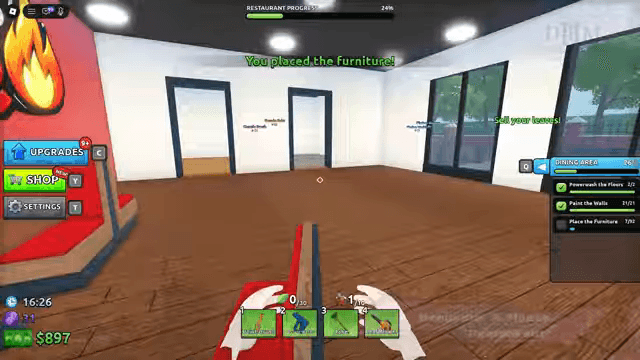
The recorded room checklist gives furniture its own counter. A room can have both washing and painting checked while furniture is still incomplete. In the Restaurant Dining Area, placement messages appear while the remaining count is still nonzero.
Start in the zone whose furniture line is incomplete. Identify the outlined furniture targets there before collecting several objects. This avoids carrying an item around the whole property without a destination.
§Match a carried item to its target#
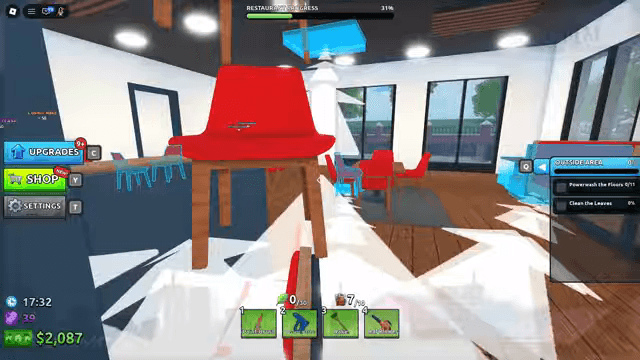
Restaurant footage shows carried chairs and cyan outlined target objects. Use the current item and placement prompts to match your furniture to the appropriate target. The recording does not establish a universal placement key for every device.
After a successful action, confirm the placement message and the zone counter. If an item drops without progress, retrieve it and recheck the target; the same video shows both dropped and placed messages. A dropped object is not evidence of completed furniture.
§Plan shorter furniture trips#
The PC Upgrades menu contains a Furniture Capacity skill. The HUD also has a held-furniture counter separate from leaves. Read that counter before collecting another item.
Suggested routine: place the items already in hand, then return for the next nearby targets. If trips dominate your finish, inspect the current capacity improvement and price. No verified inventory-transfer or duplication shortcut is provided.
§Continue your renovation#
Renovation Guides
For Renovate A House on Roblox: follow your first cleanup, find the right tool or inspect unfinished work.
Map Not Finished? Completion Checks
For Renovate A House on Roblox: inspect the active task, target response and remaining areas before leaving a session.
Restaurant Map Completion Checklist
Use the Restaurant zone panel to finish washing, painting, furniture and outdoor leaves before the final map result.
§Continue in this section#
Hub
Renovation Guides
For Renovate A House on Roblox: follow your first cleanup, find the right tool or inspect unfinished work.
GuideArticle
Map Not Finished? Completion Checks
For Renovate A House on Roblox: inspect the active task, target response and remaining areas before leaving a session.
GuideArticle
Restaurant Map Completion Checklist
Use the Restaurant zone panel to finish washing, painting, furniture and outdoor leaves before the final map result.