Video evidence checked 10 October 2026
Beginner Guide
Match the current task to its tool and complete one manageable area at a time.
Start here
Match the current task to its tool and complete one manageable area at a time.
First renovation checklist
Observed task families with current prompts taking priority.
Use the zone checklist
Read both the overall progress bar and the zone panel on the right. In the recorded House Kitchen, the checklist separates Powerwash the Floors, Paint the Walls and Place the Furniture. Outdoor zones can also list Clean the Leaves. A finished wall is only one item in that checklist.
- Success check
- The relevant inventory, task or surface counter responds.
- If it remains unclear
- Check the room panel and use the focused completion guide.
Read the supporting evidence
§Use the zone checklist#
Read both the overall progress bar and the zone panel on the right. In the recorded House Kitchen, the checklist separates Powerwash the Floors, Paint the Walls and Place the Furniture. Outdoor zones can also list Clean the Leaves. A finished wall is only one item in that checklist.
On the recorded PC HUD, Q sits beside the zone panel. Use the current panel control to inspect what is unfinished before walking away. Complete a small zone and verify its counters instead of guessing from appearance.
Rake, pick up and empty your hands
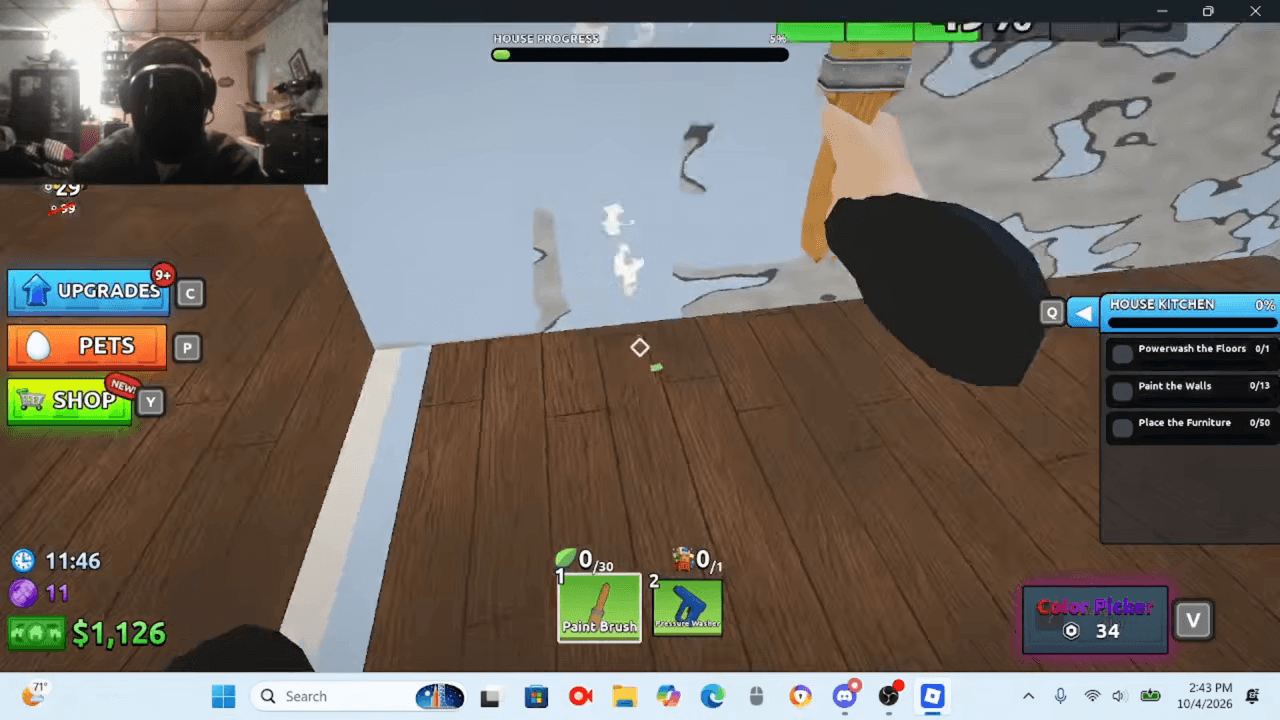
The co-op players demonstrate raking leaves toward themselves, then unequipping the rake to pick them up. The held-leaf counter beneath the screen tells you how close you are to the current capacity. Follow the hand/pickup prompt on your own device.
- Success check
- The relevant inventory, task or surface counter responds.
- If it remains unclear
- Check the room panel and use the focused completion guide.
Read the supporting evidence
§Rake, pick up and empty your hands#
The co-op players demonstrate raking leaves toward themselves, then unequipping the rake to pick them up. The held-leaf counter beneath the screen tells you how close you are to the current capacity. Follow the hand/pickup prompt on your own device.
If the red full-hands warning appears, stop trying to collect more and empty the leaves into a bin using its current prompt. At 00:11:00 the video shows 40/40 and a bin warning. That player had already bought capacity upgrades, so 40 is not a universal starting capacity.
A player describes opening a Leaf Drain and sweeping leaves into it at 00:11:33-00:11:51. Later both players question whether they are receiving money. Treat the drain as a feature observed in this run, with payout attribution and current unlock price still unverified.
Watch the surface meter and heat indicator
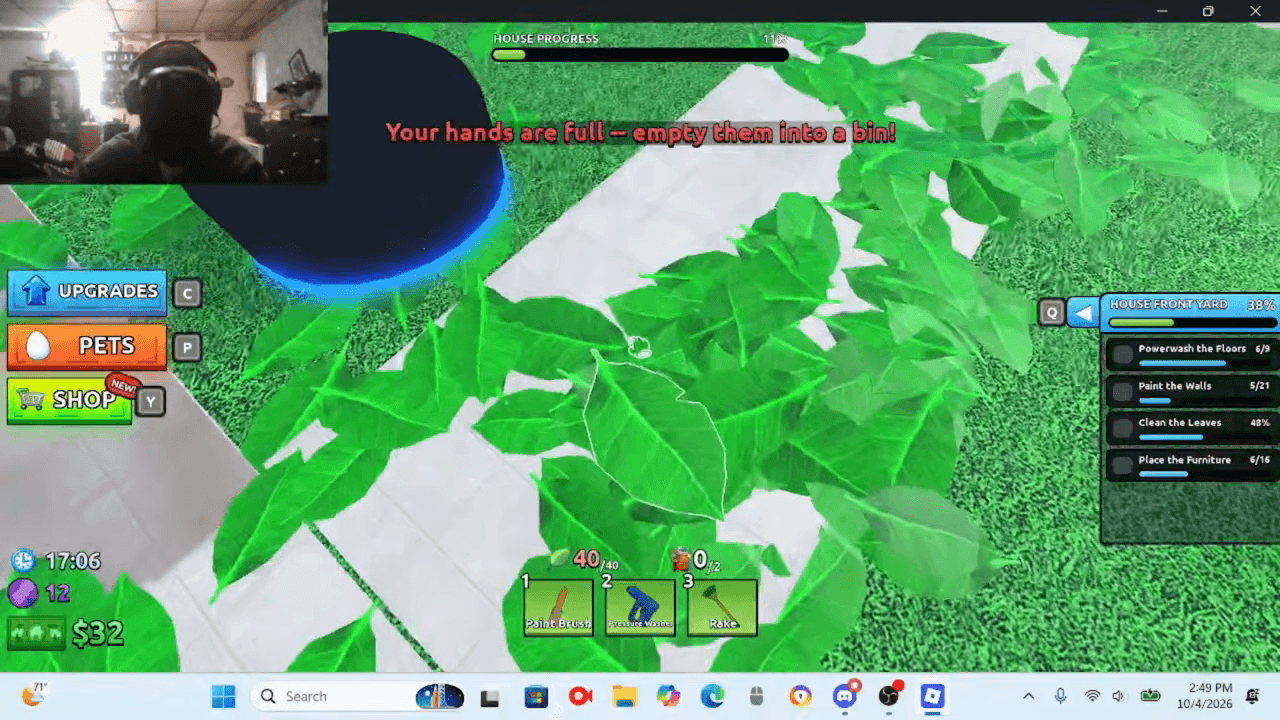
The PC recording uses Pressure Washer in slot 2. A percentage appears over the targeted dirty surface, and a circular indicator builds while spraying. The presenter mentions letting it cool at 00:12:42.
- Success check
- The relevant inventory, task or surface counter responds.
- If it remains unclear
- Check the room panel and use the focused completion guide.
Read the supporting evidence
§Watch the surface meter and heat indicator#
The PC recording uses Pressure Washer in slot 2. A percentage appears over the targeted dirty surface, and a circular indicator builds while spraying. The presenter mentions letting it cool at 00:12:42.
Work until that surface reaches its completion state, then check whether the zone floor counter advanced. If spraying pauses while the circular indicator is full, release and allow it to recover before assuming a broken tool. Exact overheat duration has not been measured.
Finish the wall and check its own counter
Paint Brush is shown in slot 1. Targeted walls have their own progress percentage, separate from the zone bar. The Color Picker is labeled V in this PC recording.
- Success check
- The relevant inventory, task or surface counter responds.
- If it remains unclear
- Check the room panel and use the focused completion guide.
Read the supporting evidence
§Finish the wall and check its own counter#
Paint Brush is shown in slot 1. Targeted walls have their own progress percentage, separate from the zone bar. The Color Picker is labeled V in this PC recording.
Finish the currently targeted wall, check its appearance and meter, then look at Paint the Walls in the zone panel. A choice of paint color is visible, but no required color for completion is established by this evidence.
Do the furniture task too
Room panels in both House and Restaurant recordings include Place the Furniture. The Restaurant footage shows a carried chair, cyan outlined furniture targets and a placement-success message.
- Success check
- The relevant inventory, task or surface counter responds.
- If it remains unclear
- Check the room panel and use the focused completion guide.
Read the supporting evidence
§Do the furniture task too#
Room panels in both House and Restaurant recordings include Place the Furniture. The Restaurant footage shows a carried chair, cyan outlined furniture targets and a placement-success message.
After washing and painting, check whether furniture is still incomplete. Find the relevant target, carry the corresponding item and follow the on-screen placement prompt. Confirm the furniture counter advances before repeating the route. The dedicated furniture guide explains this check.
Check a zone before calling the map finished
The Restaurant footage shows Zone Completed when the Patio checklist is finished, followed by a separate MAP COMPLETE result and lobby countdown. Use that result as the confirmation that the run registered.
- Success check
- The relevant inventory, task or surface counter responds.
- If it remains unclear
- Check the room panel and use the focused completion guide.
Read the supporting evidence
§Check a zone before calling the map finished#
The Restaurant footage shows Zone Completed when the Patio checklist is finished, followed by a separate MAP COMPLETE result and lobby countdown. Use that result as the confirmation that the run registered.
If the overall bar remains incomplete, revisit zones with unfinished counters. Avoid spending on a stronger washer when the remaining task is furniture or leaves.
Details and limits
1 sections§Continue your renovation#
Renovation Guides
For Renovate A House on Roblox: follow your first cleanup, find the right tool or inspect unfinished work.
Furniture Placement and Missing Targets
Finish the furniture line in each zone: identify a target, carry its item and verify the counter advances.
Restaurant Map Completion Checklist
Use the Restaurant zone panel to finish washing, painting, furniture and outdoor leaves before the final map result.
Scope and sources
Selected PC gameplay observations and explicit planning advice. Recorded-version details can change.
- PC controls and menu details were read from selected October gameplay frames. They can change with updates or differ on mobile and console.
- No universal fastest route, reward-sharing formula, save guarantee, code system or complete unlock table is established.